Appearance
Страница 1
How to Modify Person ID on iVMS-4200
Once the person ID of Access Control device created , we can’t modify it on iVMS-
4200 directly, but we can follow below steps to modify it to match the real need, such
as to match the HR employees list numbering style requirement.
Note: These steps only apply to person information and face picture, for fingerprint
data, we can only enroll again with new person ID.
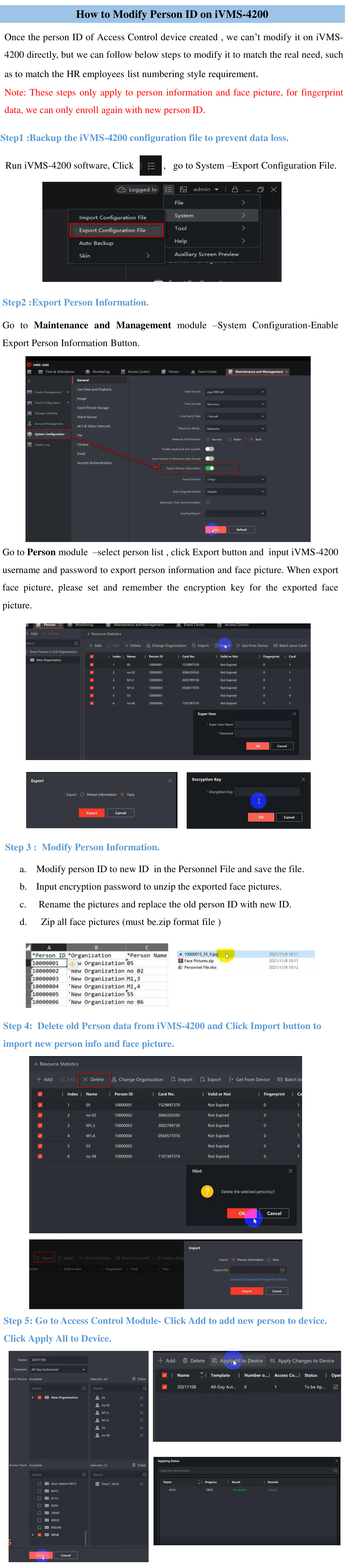
Step1 :Backup the iVMS-4200 configuration file to prevent data loss.
Run iVMS-4200 software, Click
, go to System –Export Configuration File.
Step2 :Export Person Information.
Go to Maintenance and Management module –System Configuration-Enable
Export Person Information Button.
Go to Person module –select person list , click Export button and input iVMS-4200
username and password to export person information and face picture. When export
face picture, please set and remember the encryption key for the exported face
picture.
Step 3 : Modify Person Information.
a.
Modify person ID to new ID in the Personnel File and save the file.
b.
Input encryption password to unzip the exported face pictures.
c.
Rename the pictures and replace the old person ID with new ID.
d.
Zip all face pictures (must be.zip format file )
Step 4: Delete old Person data from iVMS-4200 and Click Import button to
import new person info and face picture.
Step 5: Go to Access Control Module- Click Add to add new person to device.
Click Apply All to Device.